- SimCleaner
- Guides
- Old simulators
How to delete old iOS simulators
Run xcrun simctl delete unavailable to remove the ones whose runtime is gone, then erase or delete the rest you don't use. Preview devices and test clones have their own sets, and their own one-line commands.
xcrun simctl delete unavailable to remove simulators whose runtime is gone, then erase or delete the ones you don't use. Preview devices and test clones live in separate sets: xcrun simctl --set previews delete all and xcrun simctl --set testing delete all.Where simulators live
Each simulator is a folder named after its UDID, holding its apps, their data and its settings. Xcode keeps four sets of them in ~/Library/Developer:
| Set | Folder | simctl option |
|---|---|---|
| Your simulators | CoreSimulator/Devices | none |
| SwiftUI Previews | Xcode/UserData/Previews/Simulator Devices | --set previews |
| Parallel test clones | XCTestDevices | --set testing |
| Playgrounds | XCPGDevices | --set playgrounds |
Find the big and the unused ones
In Xcode 27, simctl reports each simulator's size and when it was last used:
xcrun simctl list devices -j | python3 -c '
import json, sys
for devices in json.load(sys.stdin)["devices"].values():
    for d in devices:
        used = d.get("lastUsedAt", "never")[:10]
        print("%6.2f GB  %-10s  %s" % (d.get("dataPathSize", 0) / 1e9, used, d["name"]))
' | sort -n
Or by folder size:
du -sh ~/Library/Developer/CoreSimulator/Devices/* | sort -h | tailDelete unavailable simulators
xcrun simctl delete unavailableThis deletes "devices that are not supported by the current Xcode SDK", usually the ones whose runtime you removed or that an Xcode update left behind. Apple's developer support suggests running it after updating Xcode (forum reply). Run it as yourself: with sudo it doesn't delete them (forum thread).
Erase or delete
Erase keeps the simulator in Xcode and Device Hub but wipes its apps, data and settings, as if it were new. Delete removes it everywhere. Both lose whatever was inside: app data, keychain items, photos you added.
xcrun simctl erase UDID
xcrun simctl delete UDID
UDID is the long identifier that xcrun simctl list devices prints after each simulator's name. Delete shuts a running simulator down by itself. Erase refuses until you shut it down with xcrun simctl shutdown UDID.
In Xcode 27, simulators live in Device Hub, an app that ships with Xcode. Open it with Manage Devices… in the run destination menu, then Control-click a simulator in the sidebar and choose Remove (Apple documentation). In Xcode 26 and earlier, the same is in Window › Devices and Simulators.
Preview devices and test clones
Xcode creates simulators for SwiftUI Previews and clones simulators for parallel tests. They don't show up next to yours, and they can add up to tens of gigabytes. Both sets can go; Xcode recreates what it needs:
xcrun simctl --set previews delete all
xcrun simctl --set testing delete all
More about these two, including why deleting clones frees less than their size suggests.
How much you'll get back
Installing the same build on several simulators doesn't copy it: APFS clones share the blocks. Those blocks are freed only when nothing uses them any more, so deleting one of several simulators with the same app frees less than its folder size. Why free space can lag behind.
With SimCleaner
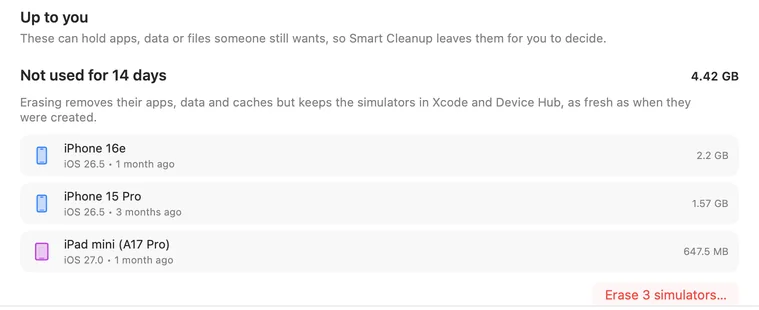
SimCleaner lists simulators from all four sets with their size, state, apps and last use. Its Smart Cleanup removes the Preview and test simulators Xcode made once nobody has used them for the period you pick. The ones you test in it only suggests, when you haven't opened them in weeks or they can't run on this Mac any more, because erasing or deleting them loses what's installed. Every change goes through simctl, and when files are shared it shows the least and the most a deletion frees.
Questions
Is it OK to delete the CoreSimulator/Devices folder?
Not by hand while Xcode or CoreSimulator is running: Xcode keeps listing simulators whose folders are gone. xcrun simctl delete all removes every simulator in that set through CoreSimulator instead, and you can create new ones in Device Hub.
Will deleting a simulator delete my project?
No. Your source code isn't in the simulator; only the installed app and its data are.
Xcode keeps old simulators after an update. Why?
Updating Xcode doesn't remove simulators for runtimes you no longer have. They stay until you delete them, which is what delete unavailable is for.