- SimCleaner
- Guides
- DerivedData
Is it safe to delete DerivedData?
Yes. Xcode recreates everything in it; deleting it costs one full build and a re-index per project. The compilation cache added in Xcode 26 is there too, and it's often what makes DerivedData grow.
What's inside
~/Library/Developer/Xcode/DerivedData has one folder per project or workspace, named like MyApp-abcdefghijklmnopqrstuvwxyz, with the build products, the index, logs and an info.plist that records where the project was. Next to them sit caches every project shares:
ModuleCache.noindex: compiled modules, often a few gigabytes.CompilationCache.noindex: Xcode 26's compilation cache (below).SDKExplicitPrecompiledModules,SymbolCache.noindexandSDKStatCaches.noindex: smaller caches for the SDK.
Delete it
Quit Xcode, or at least close the projects whose folders you remove, then:
rm -rf ~/Library/Developer/Xcode/DerivedData/*Or just one project:
rm -rf ~/Library/Developer/Xcode/DerivedData/MyApp-*If you moved DerivedData somewhere else, Xcode › Settings › Locations shows where it is. Nothing in it is source code; the next build recreates what it needs.
Clean Build Folder isn't the same
Product › Clean Build Folder (Shift-Command-K) removes one project's build products, including temporary files in /private/var/folders (Apple developer support). It keeps the index, the shared module cache and the compilation cache, which is why DerivedData can stay large after a clean.
Why CompilationCache.noindex keeps growing
Xcode 26 added compilation caching, an opt-in feature you turn on with the Enable Compilation Caching build setting (COMPILATION_CACHE_ENABLE_CACHING). Its cache is CompilationCache.noindex, and developers have watched DerivedData double after enabling it, from 20.65 GB to 47.66 GB in one report (forum thread).
In Swift Build, the open-source build system Xcode uses, the cache's default limit is half of the free space on the disk. These settings cap it (source):
| Setting | Effect |
|---|---|
COMPILATION_CACHE_LIMIT_SIZE = 10G | A fixed limit; 0 means no limit |
COMPILATION_CACHE_LIMIT_PERCENT | A share of the free space instead |
Apple's documentation doesn't describe these limits, and the copy of Swift Build inside Xcode can differ from the open-source one. Treat them as something to try, and check the folder's size afterwards.
Deleting CompilationCache.noindex is safe. Builds lose the speed-up until the cache fills again.
DerivedData for projects that are gone
Each project folder's info.plist has a WorkspacePath entry. When nothing exists at that path any more, the folder belongs to a project you deleted or moved, and it's the safest thing to remove. Coding agents add their own copies too: one report counted 19 copies of DerivedData adding up to 47 GB (agents and disk space).
With SimCleaner
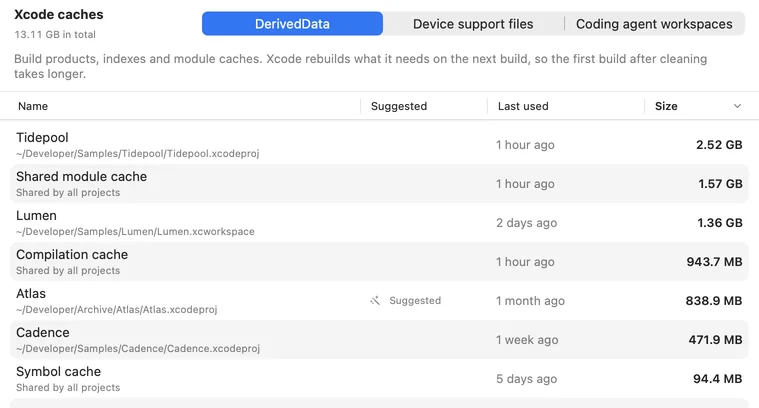
The Xcode caches page lists DerivedData by project: where the project is, when Xcode last used it and how much it takes. The shared caches get rows of their own. SimCleaner Pro marks folders whose project no longer exists. The App Store edition can't see outside the folder you grant, so it doesn't guess.
Questions
Will deleting DerivedData delete my code or settings?
No. Your project and its schemes live in your project folder; Xcode settings live in Xcode/UserData.
Does deleting DerivedData fix build errors?
Sometimes, when stale build products or a broken index are the problem. Try Clean Build Folder first; delete the project's DerivedData if that isn't enough.
How often should I delete it?
Whenever you need the space. Keeping the folders of projects you're working on saves build time.